Documents without imputation
 A1 proofreading not yet effective for this page. In the meantime, you can ask any questions on the forum.
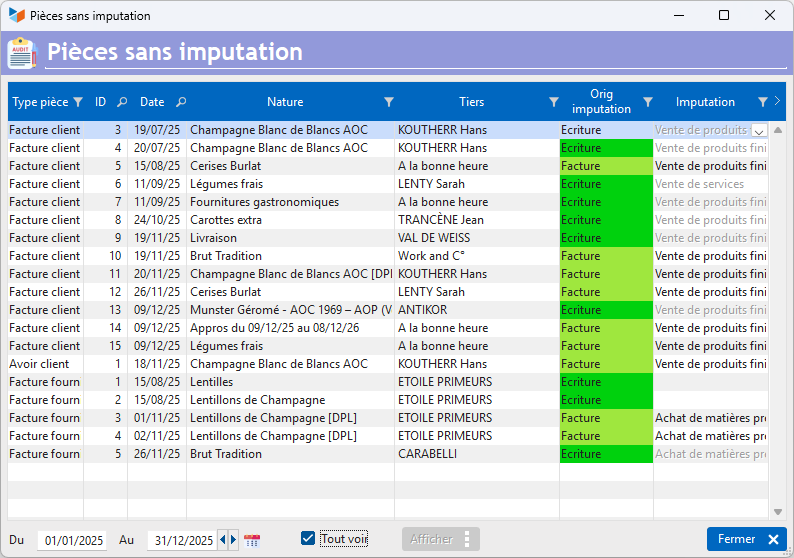
This control screen allows you to assign an imputation to documents that do not have one, or to modify the default imputation for a particular document.
This processing is useful if you use the XIMPORT export, or if you consult the accounting screens: Journal, General Ledger, Balance, Income statement.
Using the screen
Access: Accounting → Controls → Imputation of documents
The imputation of a document, i.e. its allocation in the accounting, is carried out as follows:
- the program begins at the finest level: if, for each item line, there is an accounting link concerning the product or its family, for the type of customer considered (that of the item), and for the type of operation (import or export, or sale on the national territory), each part line will be assigned to the link account.
- if the previous case is not carried out, the program will read the entries, to assign to the lines which are not concerned by the accounting links an imputation which will be deducted from the imputation of the entry linked to the document.
- finally, if all the document lines are not affected by the accounting links, and there are no entries linked to the document, the document will be assigned to default imputation.
- finally, if the default imputation is not specified, an explicit imputation will be requested.
Note that it is possible to use this program to reassign this or that document which would not ideally be classified in the default allocation.
You must enter a date range for which the check must be carried out. The Show button allows you to display the parts concerned.
You can modify the allocation of problematic documents directly in the table.
The context menu allows you to display all the documents with their default assignment (if they have been specified in the accounting settings - default imputation for professional receipts and for professional charges), or to assign a particular type of document (invoice, credit note , etc) to such imputation. It also allows you to erase everything.
 Other Accounting articles
Accounting document options
Accounting entries
Accounting entries
Accounting journals
Accounting links
Accounting settings
Accounting with Gestan: the main principles
Bad debts
Balance
Bank account statements
Bank or cash accounts
Billing by tax rate
Certification of cash register software - NF525 standard
Chart of accounts
Delivery of checks
Documents without imputation
Export CFONB
Fixed assets
General Ledger
Income and expenses
Income statement
Lettering
Log codes
Mass links: entries
Micro-Enterprise / Self-Enterprise
Payments
Pointing of supporting documents for VAT
Review entries
SEPA Export
Third party balance
VAT calculation
VAT orders
XIMPORT export of accounting data