Table des matières
Micro-Enterprise / Self-Enterprise
 A1 proofreading not yet effective for this page. In the meantime, you can ask any questions on the forum.
In 2009, the self-employed regime was created in France, with two major advantages:
- payment of social security contributions only in the event of turnover,
- simplified calculation of taxes and contributions, as a percentage of turnover.
It aimed to simplify the lives of owners of small businesses, or to encourage the exercise of a secondary activity. For this reason, the companies concerned must not exceed turnover ceilings determined by their type of activity.
Very simple at the start, the French administration has gradually complicated it, following the propensity in which it excels, adding over the years a shower of taxes, and derogatory conditions…
Find out more about the micro-enterprise regime: on the CCI website, and on the administration website.
Gestan allows you to calculate the social contributions of micro/self-employed entrepreneurs (the two schemes were merged in 2016), and to record the payment of contributions.
Settings
General settings
When starting Gestan, if you had chosen “micro-enterprise plan”, this setting is implemented automatically. However, here are the points to check:
- in the general configuration, the use type must be Micro/Self-business, and the box Non-VAT subject must be checked ( the wording of non-taxability may be: VAT not applicable - art 293 bis of the CGI) if this is the case.
- the default VAT rate must be zero.
- in the accounting configuration, the product and load classes (6 and 7 respectively in France) must be defined.
- the imputations must include those necessary for recording your receipts (one per type of charge (for example Commercial, Presta Self-enterprise, and Professional receipts - At least two imputations are necessary to a mixed activity (commercial/service). Only one would be sufficient for a self-employed business of a single type (either commercial or service), as well as an allocation of charges for the URSSAF.
Specific settings
Access: Tools→Application settings→Accounting settings→Microbusiness settings
You must configure the imputations which must be taken into account as revenue, either for the commercial activity or for the service (or liberal) activity.
This setting is made with the screen below.
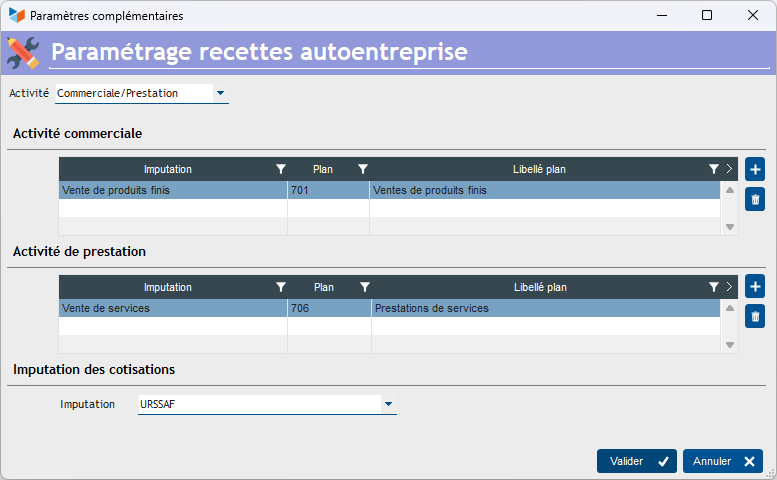
Start by specifying your type of self-business, here a mixed business/service business.
Then you indicate the imputations to be considered as either commercial or service (or liberal, as the case may be) revenue. Here, for this mixed activity, we have designated the imputation “Sale of finished products”, linked to plan account 701, while for the service activity, it is the imputation “Sale of services”, linked to account 706.
Finally, specify on which imputation the corresponding tax entries are recorded, here “URSSAF.
Using the screen
Access: Accounting → Microenterprise contributions
Start by entering the contribution rates and the CA ceilings. They change very regularly, and you can find these elements on the URSSAF portal on self-employed businesses (http://www.lautoentrepreneur.fr). They will be memorized for the next calculation.
The Payment method combo allows you to indicate the frequency of your payments. Depending on this choice, the start and end dates of the reference period are displayed. And the Calculate button allows you to calculate the amount of contributions due for the period.
Then select the calculation period, then use the Calculate button.

The Save button allows you to record in accounting the contribution disbursement corresponding to the calculation.
The principle of calculation is as follows:
- Gestan browses all the accounting entries for the period.
- For each entry that must be considered as a company revenue (i.e. declared as such in the settings):
- if it is broken down, the trade/service amounts are calculated from the allocations of the breakdown.
- if it is neither broken down nor linked to a document, the amount is allocated to trade or service depending on the imputation of the entry
- if it is not broken down but linked to a document (customer invoice or customer credit), the amount of the entry is allocated to commerce/service according to the trade/service pro rata deducted from the product families of the part considered (families of type “Supplies” are considered as commerce, all others are considered as services) .
 Other Accounting articles
Accounting document options
Accounting entries
Accounting entries
Accounting journals
Accounting links
Accounting settings
Accounting with Gestan: the main principles
Bad debts
Balance
Bank account statements
Bank or cash accounts
Billing by tax rate
Certification of cash register software - NF525 standard
Chart of accounts
Delivery of checks
Documents without imputation
Export CFONB
Fixed assets
General Ledger
Income and expenses
Income statement
Lettering
Log codes
Mass links: entries
Micro-Enterprise / Self-Enterprise
Payments
Pointing of supporting documents for VAT
Review entries
SEPA Export
Third party balance
VAT calculation
VAT orders
XIMPORT export of accounting data