Table des matières
VAT calculation
 A1 proofreading not yet effective for this page. In the meantime, you can ask any questions on the forum.
This screen uses accounting data to calculate VAT, starting from the date of your choice.
Using the screen
Access: Accounting → Accounting documents → VAT

The Generate button triggers the VAT calculation for the specified date range.
The details of the VAT are presented in the table on the left, while the accumulations which will be used for the declaration are presented in the table on the right.
The anomaly movements table displays all untargeted or unjustified entries.
After the VAT calculation, the VAT order for the month is calculated and stored in the VAT order file: this is the VAT amount (creditor or debtor), taking into account the VAT balance (creditor or debtor). debtor) of the previous month. The VAT balance from the previous month is displayed in box 1. You can modify it, depending on the accounting data, and store it in the VAT order file
The Print button allows you to generate the detailed report of the entries taken into account for the calculation of VAT as well as the CA3 form (France).
 Printing this form is prohibited if all entries are not recorded (the bank reconciliation must have been carried out). If all seats are not justified, you do not need to print a form: in fact, the VAT calculation will be carried out despite the absence of supporting documents.
The Lock button blocks the month in question: if the month is blocked, it will no longer be possible to make accounting changes that would affect it from an accounting point of view.
Printing the detailed list
The Print button allows you to print the detailed VAT extract.
The VAT totals due (gross VAT) are totaled according to the VAT rates of the registrations, the deductible VAT totals are broken down into fixed assets and services according to the imputations of the purchase entries.
The previous VAT report is read from the VAT order file.
Depending on the VAT options, the account statement is different:
- in VAT on collection, we take on the sales side all the professional seats credited to the accounts, and on the purchases side all the professional seats loaded on the accounts
- in VAT on debits, on the sales side we have the list of the amounts of all unpaid customer invoices for the date interval, plus the list of professional entries in favor of accounts not linked to the invoices, and on the purchasing side all professional seats loaded on the accounts
Example of VAT declaration for the preparation of CA3
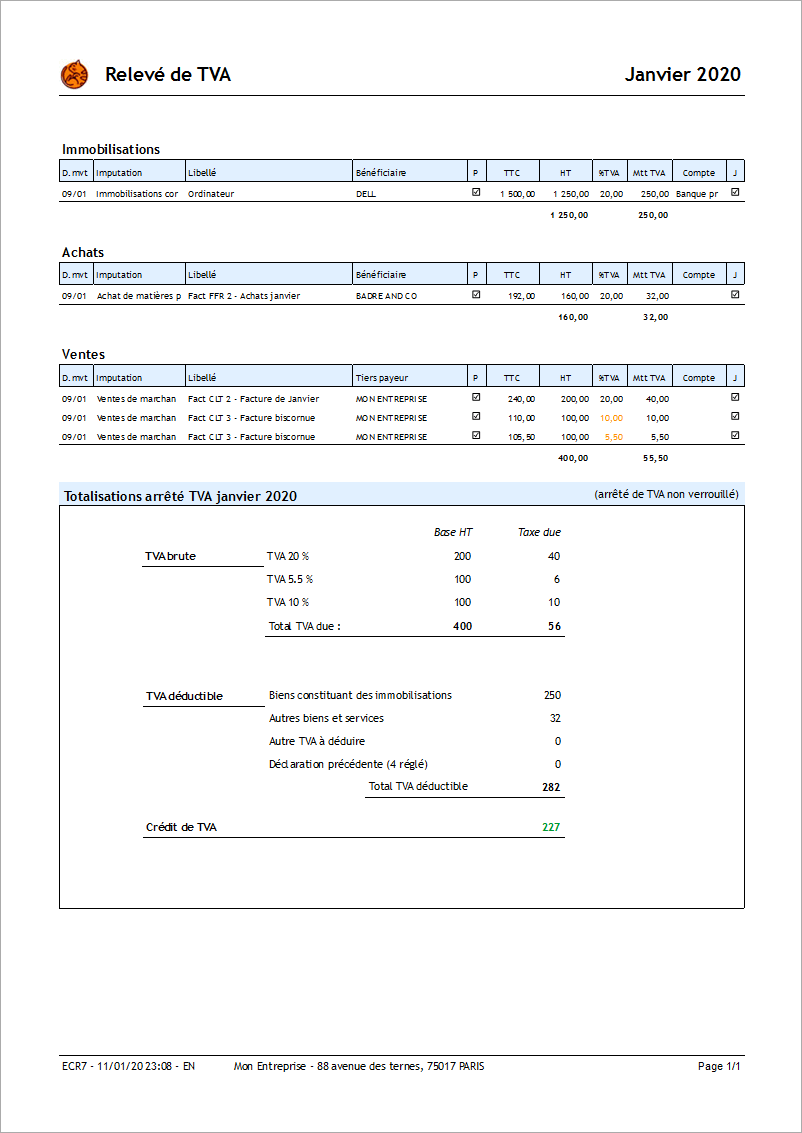
Printing of the CA3 declaration
The Print button allows you to print the VAT form N°3310-CA3-SD valid for France (CERFA N°10963*25).
Prerequisites: Create an account for Recoverable VAT and Collected VAT for each VAT type you use (both buying and selling), as shown below.

Example of CA3 - version 2022
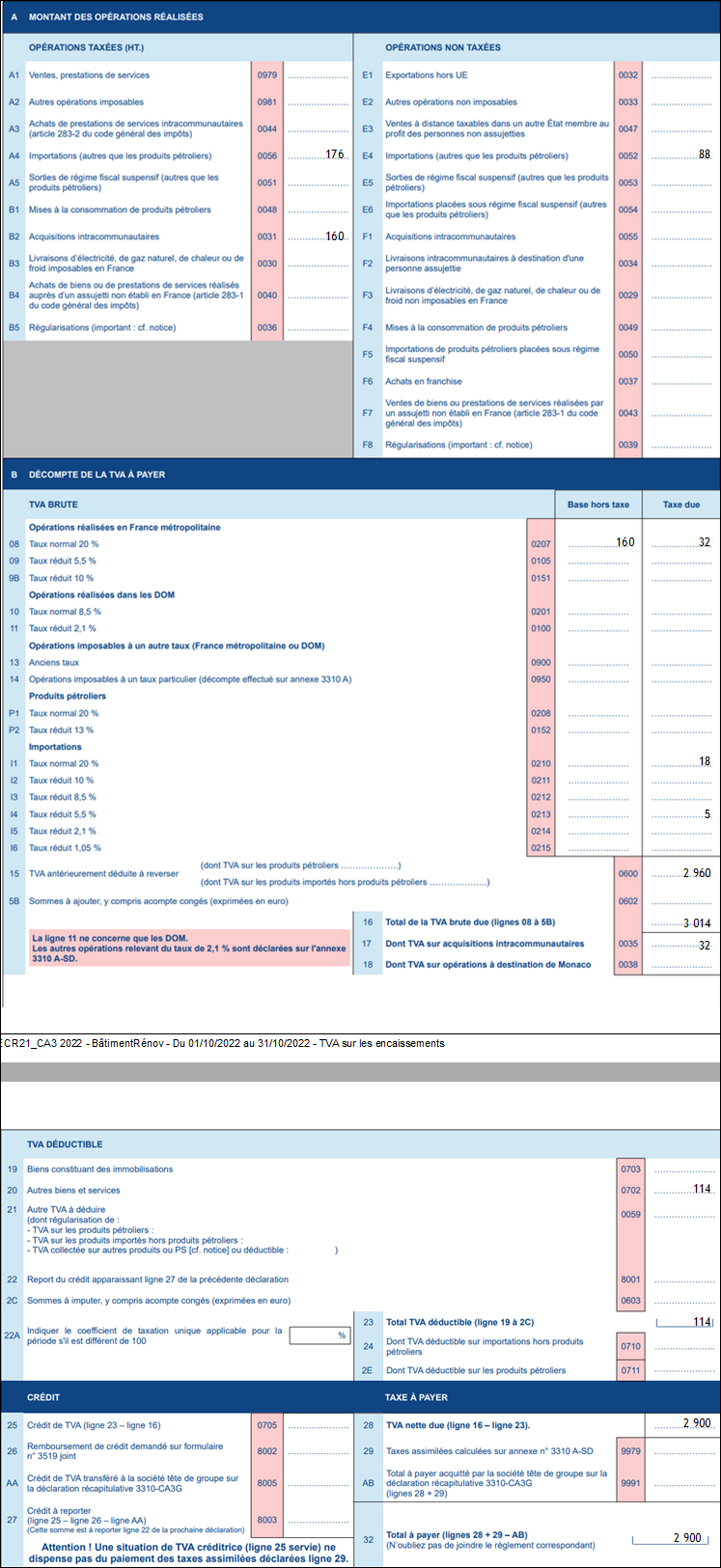
 In the 2022 version of CA3, table A:
- all France and Overseas with VAT sales (GLP, MTQ, PYF, REU, MCO) are grouped in box A1,
- box A3 publishes services in the EU
- box A4 taxed imports
- box B2 purchases of EU goods
- box E1 exports them outside the EU and the French Overseas Territories at 0%
- box E2 non-taxable French sales + sales of EU, Guyana and St Martin services
- box E4 untaxed imports
- box F2 EU, Guyana and St Martin sales of goods
- the other boxes in box A are not filled in automatically.
The regime (collection or debit) is taken into account for all sales.
Example of CA3 (2021 version for memory)

In this version of CA3, table A is populated as follows:
- all sales are grouped in box 01,
- all purchases in box 03 (without distinction of purchases of goods and services, without distinction of extra-community purchases)
- Tax-exempt transactions have not yet been calculated
Generation of the VAT OD
The Button Gen. OD allows you to automatically generate the corresponding VAT OD.
Any difference between the rounded amount of VAT declared in CA3 is carried over to the account of other current management losses or profits.
 Other Accounting articles
Accounting document options
Accounting entries
Accounting entries
Accounting journals
Accounting links
Accounting settings
Accounting with Gestan: the main principles
Bad debts
Balance
Bank account statements
Bank or cash accounts
Billing by tax rate
Certification of cash register software - NF525 standard
Chart of accounts
Delivery of checks
Documents without imputation
Export CFONB
Fixed assets
General Ledger
Income and expenses
Income statement
Lettering
Log codes
Mass links: entries
Micro-Enterprise / Self-Enterprise
Payments
Pointing of supporting documents for VAT
Review entries
SEPA Export
Third party balance
VAT calculation
VAT orders
XIMPORT export of accounting data