Table des matières
Export Gestan database
 A1 proofreading not yet effective for this page. In the meantime, you can ask any questions on the forum.
The database export program lets you :
- use Gestan on another medium, such as a USB key or external hard disk. In this case, the database will not be compressed, and all files required to run Gestan on the external medium will be exported as well.
- to make a backup of the database at a given moment. The database will then be compressed in zip format, and can be imported at a later date, provided that the version of the program at the time of import is identical to the version of the data.
Using the screen
Access: Tools → Administration → Export Gestan database.
See also the “Gestan on a USB stick” and “Directory structure” pages for a better understanding of what is involved.
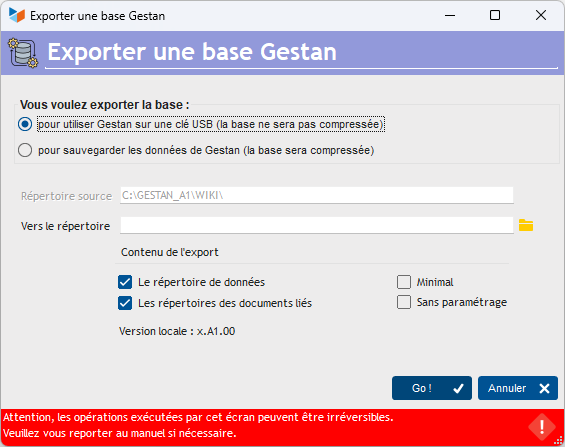
The source directory is that of the database to which you are connected, in which the data to be exported is stored.
The To directory field is the directory to which you want to export the data in the source directory.
You can export :
- the data directory (the one containing the .fic, .mmo, .ndx files)
- the linked documents directory (the one containing files linked to contacts)
At least one of these two options must be selected.
Export for use on USB stick
Export to USB key allows you to generate the file tree you need to use Gestan on a USB key, in “portable application” mode.
In this way, the program exports :
- program files (including gestan.exe)
- the necessary dynamic libraries (dll)
- data managed by Gestan (DATABASE),
- files in the RESOURCES directory
- and any external files in DOCUMENTS
If the Minimal box is ticked, the dynamic libraries will not be copied, nor the RESOURCE directory: you can tick this box when your external media already contains these files (if you have previously made a “non minimal” export, they are there), export time is shortened.
The No settings box allows you not to export general settings or user parameters. This means you don't have to modify the parameter settings you've made on your USB key (for example, you make an initial export. Then, using the program on the USB key, you uncheck the todo list and stopwatch display. On the second export to the same directory, if this box is checked, your settings will be preserved and you won't have to redo them).
 Gestan will generate a special USB connection file, specifying that the connection must go through the login screen. USB sticks are easily lost, so to protect your data, we strongly advise you not to activate the password memorization function.
This mode of operation, very practical in certain cases (confidentiality, use of several computers not connected to a network, etc.) involves inherent risks: risk of loss or theft of your USB key, fragility of the medium, slowness of response time if the USB key is of low quality.
Export for backup
This export creates a compressed “zip” file for archiving your data.
You can use this function to keep a “snapshot” of your database at a given time. For a backup, this is not ideal: in fact, production data that changes every day needs to be backed up every day, so we strongly recommend using an automatic backup program (see backup Gestan).
 Do not change the name of zipped export archives! Gestan will use this archive name to check the data version at import time.
 Other “Tools ” articles
Connection to Gestan
Database minimization
Export Gestan database
Gestan base import
Gestan directory structure
Gestan on a USB stick
Gestan Versions
Import a chart of accounts
Import account assignments
Import contracts into Gestan
Import Google/Outlook/Notes contacts
Import parts into Gestan
Import product translations
Importing data into Gestan
Maintenance of HFSQL files
Mass Parts Removal
Quick start
Reallocation of contacts by region
Reassignment of users
Rebooking entries
Reset additional fields
Reset categories
Resetting files
Tips and tricks
Transfer your data to technical support
Zip the base