Table des matières
Gestan Versions
 A1 proofreading not yet effective for this page. In the meantime, you can ask any questions on the forum.
What is your version of Gestan?
The version number is indicated on the top left corner of the Gestan main screen. For example “GESTAN Company 15.07.04”.

Standard version V/S Enterprise version
If the Enterprise version offers functions that are not available in the Standard version, the databases are identical: you can run Gestan in the Standard or Enterprise version on the same database.
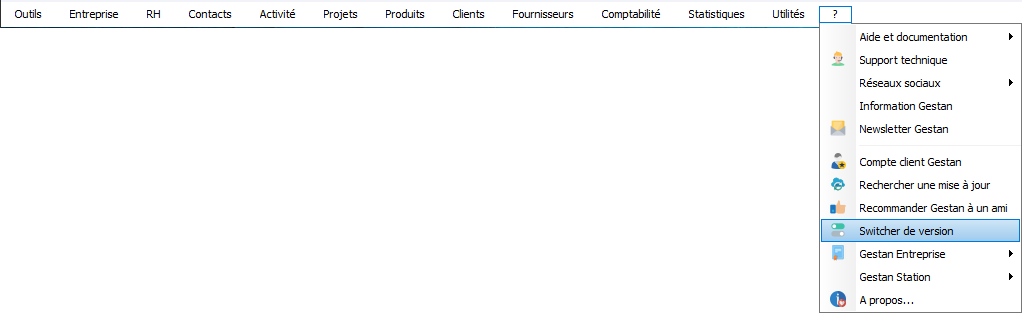
To do this, use the menu: ?→Version switcher.
What are the differences between the Standard and Enterprise versions?
They are very numerous, and of two types:
- functional: the functional scope of the Enterprise version is broader. For example, in the Enterprise version you have supplier accounting, inventory management, machine management, the possibility of using extensions, client/server mode, etc.
- ergonomic: the Enterprise version is full of tips that save you time. Compare, for example, the context menu of the list of invoices in the two versions: that of the enterprise version is rich in many additional options.
 More details on this page.
Gestan version numbers
Version numbers are structured as follows:
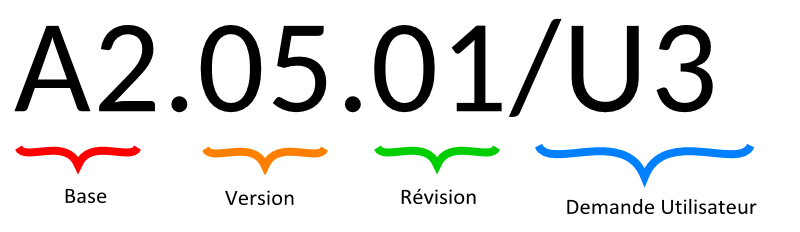
For example, for version 15.30.02/DU3:
- 15 (base): is the database version number, currently 15.
- 30 (version): is the version number of the program.
- 02 (revision): is the revision number of the program.
- with possibly a suffix /DU xx, when it concerns an urgent user request.
Database changes
Each time the structure of the database files is modified (for example, adding an additional field to a file), the database version number is incremented (except for a simple addition).
The database and program number must be the same, otherwise a runtime error will be detected. For example, you cannot run Gestan 13.00 on 15.00.0B data: there is no backward compatibility on versions with different base numbers.
Functional level changes
Each time the program is modified without structural modification in the database files, for example the addition of a new state, or a new functionality, the version or revision number is incremented. If it is a version change, there is an impact on the data: new managed file, new data in the reference files, etc.
At each version change, the version change window is displayed, and makes any necessary modifications.
Ux Version (User Request)
In certain cases, for example a non-blocking bug in a rarely used function, or a small improvement which saves a lot of time on a one-off need, we can make a “Ux” version available, in order to address the problem with users. concerned, without requiring all users to update.
This version is available at this link: https://gestan.fr/downloads/preprod/Gestan.exe
This is a simple executable, bearing the current version number with the suffix Ux. For example, if the current version is 15.35.05, the U4 will be numbered 15.35.05/U4, for example. Then we will move on to 15.35.06.
To install it: download the Gestan.exe file from the link above, and simply copy it to your program directory (usually: C:\Program Files X86\Gestan).
 Only download the Ux versions upon suggestion from Gestan Technical Support!
 Other Tools articles
Connection to Gestan
Database minimization
Export Gestan database
Gestan base import
Gestan directory structure
Gestan on a USB stick
Gestan Versions
Import a chart of accounts
Import account assignments
Import contracts into Gestan
Import Google/Outlook/Notes contacts
Import parts into Gestan
Import product translations
Importing data into Gestan
Maintenance of HFSQL files
Mass Parts Removal
Quick start
Reallocation of contacts by region
Reassignment of users
Rebooking entries
Reset additional fields
Reset categories
Resetting files
Tips and tricks
Transfer your data to technical support
Zip the base