Table des matières
ODBC on HFSQL
 A1 proofreading not yet effective for this page. In the meantime, you can ask any questions on the forum.
Since the application of the provisions of the 2018 Finance Law establishing drastic restrictions on access to software data, the use of the ODBC driver on Gestan's HFSQL databases is only accessible to partenaires Gestan.
Presentation
 The ODBC driver on HFSQL Classic (single-station or network) is a level 2 ODBC driver which allows access to an HFSQL Classic database, in reading and writing, from any external software managing access via ODBC.
Thus, an application written in a third-party language, for example in Visual Basic, will be able to read and write to Gestan HFSQL files.
Installation
Download the ODBC Driver for HFSQL file from this page, and run the installer.
The ODBC driver will be installed in the “Program Files\Common Files\PC Soft\28.0\ODBC” directory.
The directory may vary depending on the versions of WinDev, so you must replace “28” with the current version in the download link as well as the directory link.
Configuration
 To use the ODBC driver on HFSQL Classic or Client/Server:
- Launch the ODBC Data Administrator (ODBCAD32.EXE) on your computer. For example, use the Windows “Start..Run” option and enter “ODBCAD32.EXE” (In Windows Vista or higher in 64 bits, launch “c:\windows\syswow64\odbcad32.exe”).
 Remember to launch ODBC which corresponds to your version of Driver: if you have installed the 64-bit version of the driver, you must use the 64-bit version of the data administrator. If you use the wrong version you risk not finding the “HyperFileSQL” driver.
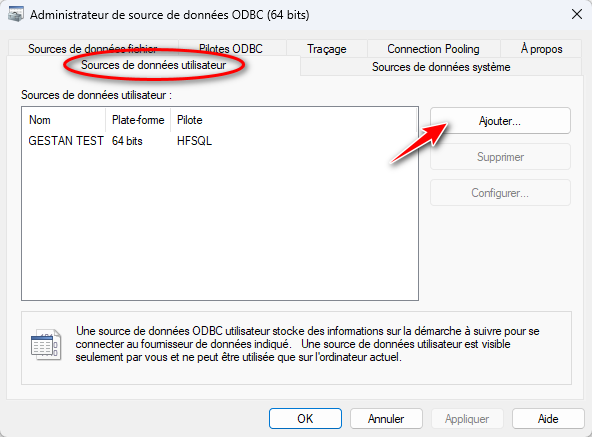
- Select the User Database tab.
- Click the “Add” button.
- Select the “HyperFileSQL” driver.
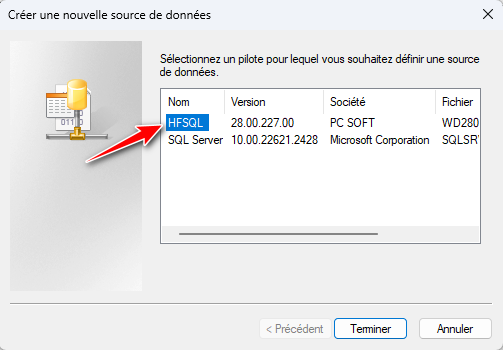
- Click the Finish button.
- Enter the name of the HFSQL data source, for example GESTAN. This name will identify the HFSQL database in external programs.
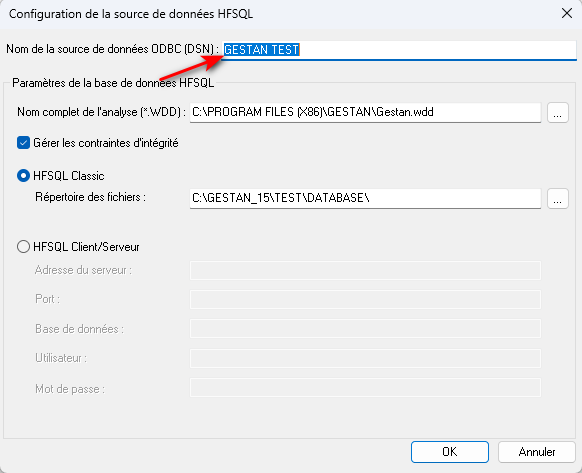
- Click on the Detail button.
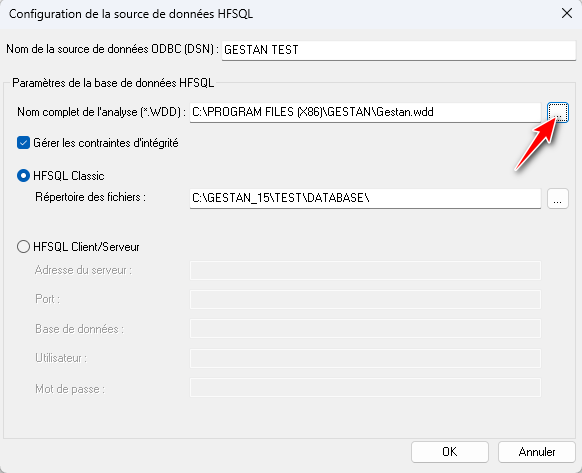
- Select the WDD file corresponding to the analysis using the browse button. This is gestan.wdd, present in C:\Program Files\Gestan.
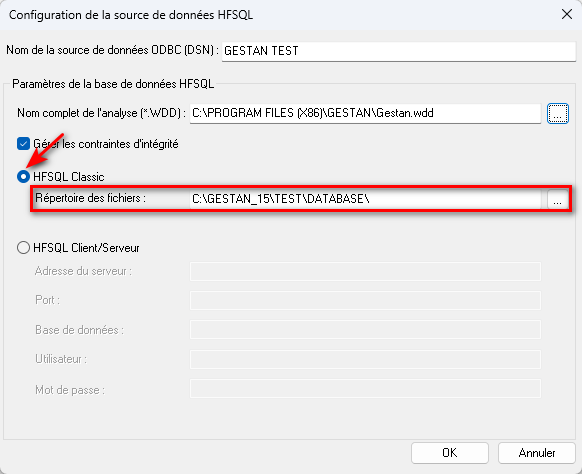
If the database is in “HFSQL Classic” format, check the “HFSQL Classic” option then select the corresponding data file directory using the browse button. Validate (OK button).
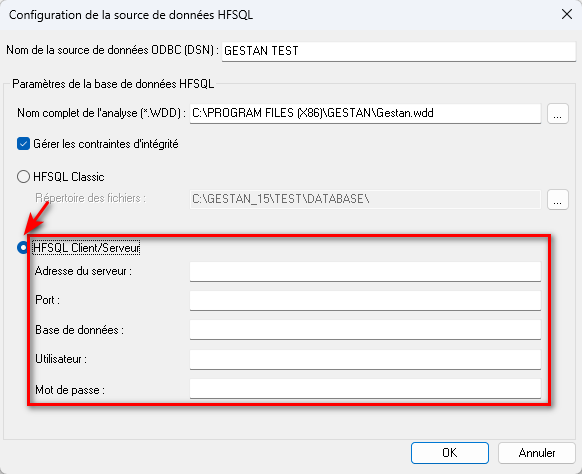
If the database is in “HFSQL Client/Server” format, check the “HFSQL Client/Server” option and indicate the parameters of the connection to the server: The server address, The port, The name of the database to use, The name of the user used to access the database, The password associated with the user. The password is stored encrypted. Validate (OK button).
The database can be used for reading and writing from external programs via the ODBC driver on HFSQL Classic or Client/Server.
Management of OPEN FILE requests
It is possible to use OPEN FILE type queries on HFSQL files by specifying: the PATH keyword to change the file directory. the USING keyword to specify the file password. The possible syntax is as follows:
OPEN FILE <File name> [PATH <File directory>] [USING <File password>]
Example :
OPEN FILE Client PATH "C:\Temp\My test" USING mypassword
It is possible to surround the names of files, directories and the password with quotation marks if these names contain spaces.
Access HFSQL Client/Server files
Thanks to OPEN FILE queries, it is also possible to access HFSQL Client/Server databases. Just specify: the server to use using the SERVER keyword the base to use using the DATABASE keyword the user using the keyword USER the file directory using the PATH keyword
Example :
OPEN FILE * SERVER ServerTest DATABASE Example USER Admin PATH MyBaseHFCS
Note: It is possible to surround file names, directory names and the password with quotation marks if these names contain spaces.
INSERT type query
When executing an INSERT type query, the SQL.AutoId variable contains the automatic identifier added during the previous INSERT.
Remarks and limitations
- Deleting a driver When deleting the DLLs of a driver, it is first necessary to delete data sources using this driver. Otherwise, the application may be blocked.
- Use the most recent version of the driver To use the most recent version of a driver, it is necessary to delete the data source and recreate it using the proposed “HyperFileSQL” driver.
- Access 2000 When importing a table from an ODBC data source into Access 2000, the HFSQL Classic data source must be defined as “Machine Data Source” and not as “Source Data File”.
- Unicode The ODBC driver supports Unicode.
See the original doc on the PCSoft website: this page.
 Other Technical articles
Configure Gestan
Configure the search
e-Mailing: good practices
Gestan CS - Client/Server mode
Gestan data backup
Gestan on a MAC
Google SMTP Server
libcef.dll file not found
Mail outsourcing
ODBC on HFSQL
Online payment
Reports and Queries
Rounded
Send emails with Gestan
Specific developments