Ceci est une ancienne révision du document !
ETIQUEXPED: Shipping labels * *
 Migration in progress
Overview
This extension is designed to print shipping labels, the kind you stick on all the boxes you drop off at the carrier.
You can print labels like this:
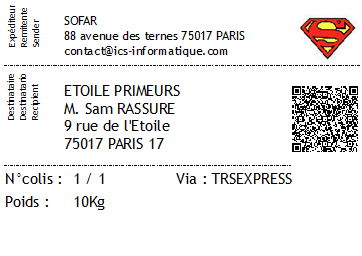
The QR code (optional) contains the following information:
- EXPED: [the sender's details]
- DEST: [the recipient's details]
- Parcel number: [the parcel number, for example 7/12]
- [the carrier name]
- [the shipment reference number]
Use
In Gestan, installing the extension adds a menu option in the ‘Utilities’ menu.
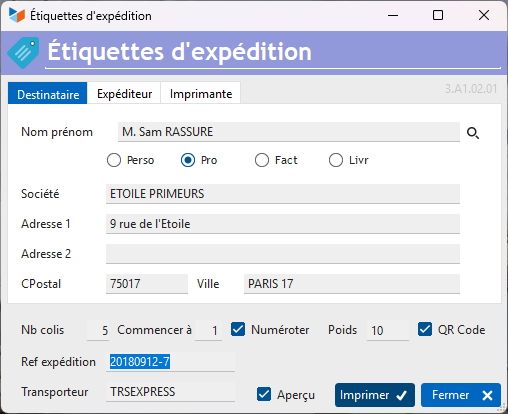
The first tab on the screen allows you to specify the recipient's address.
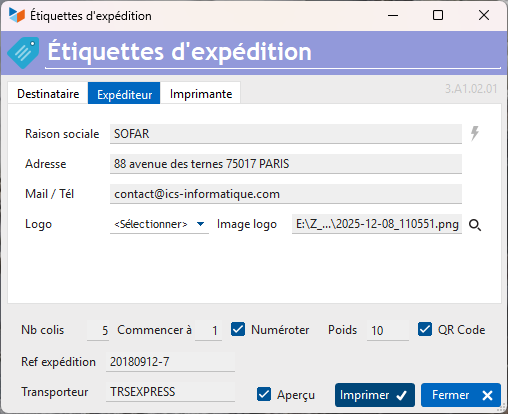
The second tab allows you to specify the sender's details. You can choose whether or not to print a logo, which can be either your own or that of the carrier. You can specify a carrier name or leave it blank.
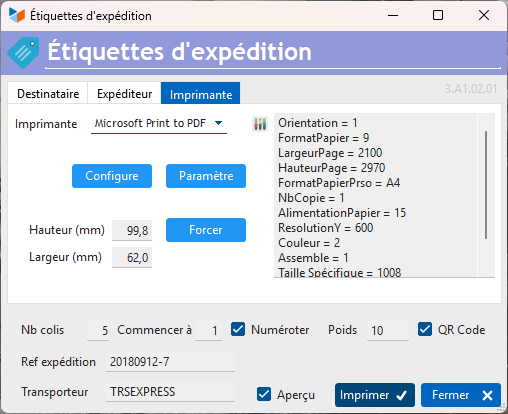
The third tab allows you to configure the default printer that will be used for labels. We developed this programme using a Brother QL-700 printer and DK-11202 self-adhesive rolls, size 100*62. However, as you will inevitably have a different printer and label format, we have included a few buttons on this screen that should allow you to configure it.
The following fields are available at the bottom of the screen: * No. of parcels ** the number of parcels, which will determine the number of labels * **Start at and Number allows you to display a parcel number on the label, in the form Parcel No. X/Y. For example, for 5 parcels, you will print labels 1/5, 2/5, etc., up to 5/5. The ‘Start at’ field allows you to start at 4/5, for example, if you have already printed the previous ones.
- It is possible to include the weight of the parcel on the label, as well as a QR code.
- You can also indicate a shipping reference and the name of the carrier.
The Print button will start printing as many labels as there are parcels.
 You can put whatever you want in the Shipment reference and Carrier fields. For example, you can put the Incoterm code, the hazard class, etc. instead.
Versions
| Version | Date | Comments |
|---|---|---|
| 3.A1.02.01 | 25/12/08 | Migration to A1 format |
 Other articles ‘Extensions’
CAISSETACT Caisse tactile (paramétrage)
CAISSETACT Caisse tactile (Utilisation)
CARNEDBOR : Carnet de bord véhicule
CERFA : Génération de CERFAs
CHRONSTAT : Séries statistiques liées au temps
COMMISSIONSCO : Commissions commerciales
CYBERBANQUE : Intégration fichiers bancaires
DEV : Développements (informatiques)
DRM : Déclaration Récapitulative Mensuelle
EBAY : Interface eBay
ETATSPE : États spécifiques
ETIQSPE_ICS : Étiquettes spécifiques
ETIQUEXPED : Etiquettes d'expédition
FACTURETTE : Génération de facturettes
INTEROR : ordres de réparation (OR)
INTERWEB : Gestion web des interventions
LOADIMAGE Chargement en masse d'images
OBJVENTE : Objectifs de vente
PREPBON : Bons de préparation
PRESTIMPORT : Interface Prestashop
PROPALE : génération de propositions commerciales *
PROSPECTS : Gestion des prospects
PROSTEP : Étapes de prospection
RELAUTO : Relance automatique de facture en masse
SAVTICKET: Tickets de SAV
SCAN : Scanner un code barre
SIGNATURE : signature électronique des devis
SMS: Envoyer des SMS avec Gestan
STATEC : Export STATEC
SUIVCOM : Suivi des commandes
TRESO : Gestion de trésorerie *
URSSAF: Avance de crédit d'impôts
WISHLIST : Liste de courses
WOOCOMMERCE Commerce en ligne
WORDPRESS Espace client sous Wordpress