Ceci est une ancienne révision du document !
OBJVENTE: Sales targets * *
 MIGRATION TO A1 FORMAT IN PROGRESS.
Overview
This extension allows you to set sales targets by product and by salesperson (registered as a Gestan user), and to compare the target with the actual results.
Entering targets
Access: Statistics→Sales targets→Enter targets
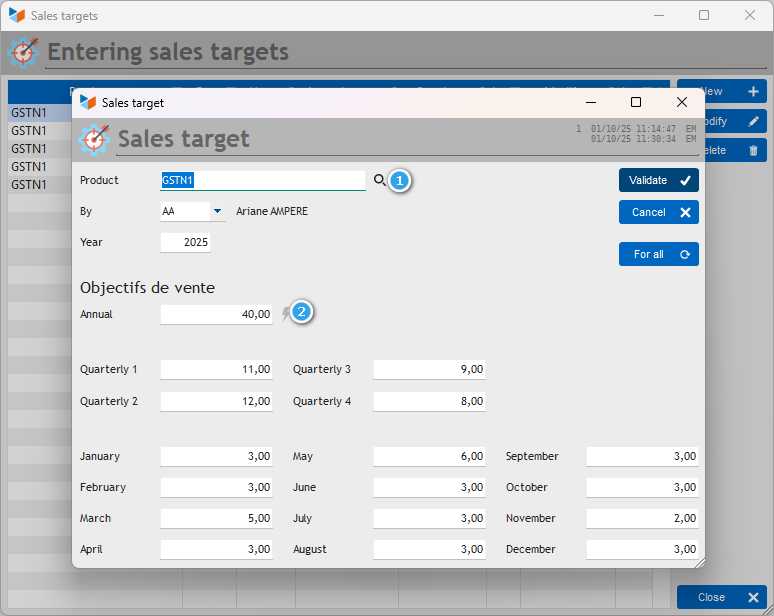
Targets are entered by calendar year. However, you can display the results by month, quarter, or year.
To do this, you must first select a product (the magnifying glass (1) opens the product selector, but you can enter the code directly), then a sales representative to whom the target is assigned.
You can then assign an annual target to them. If you click on the small lightning bolt (2), the annual target will be distributed evenly across the quarterly and monthly targets.
If you modify a monthly target, the quarterly and annual targets are recalculated.
The For all button assigns the displayed targets to all non-archived users (please note that any existing targets will be overwritten).
Viewing results
Access: Statistics→Sales targets→Viewing results
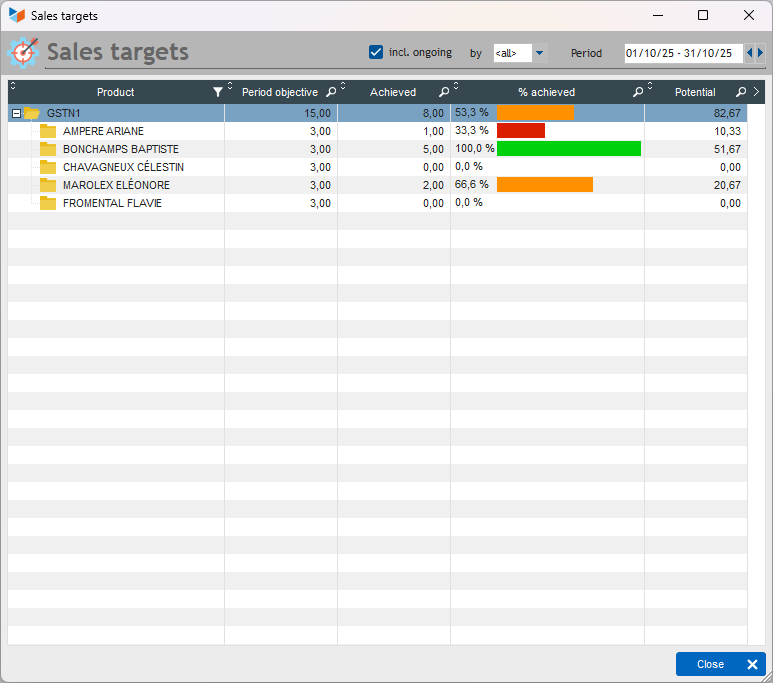
The display screen allows you to select the sales representative whose results you wish to view. The calculation period can be a month, a quarter, or a year.
The Period target column shows the target assigned to the sales representative for the period. The Achieved column is calculated based on invoices dated within the period whose status is not ‘in progress’ (unless the yc in progress box is checked).
The column displays the % achieved (it is displayed as 100% when it is above the target). When less than 50% of the target is achieved, the gauge is red. When more than 75% of the target is achieved, the gauge is green.
The Potential column is an indication of the number of sales that could theoretically be achieved on a pro-rata basis over the period. In the example above, we asked for the month of February, and today is 20 February. As of 20 February, we are 71% of the way through the month. So for Blandine, who has sold 10 blenders, she should sell 14 by the end of the month if she does reasonably well.
Versions
| Version | Date | Comments |
|---|---|---|
| 3.15.03.01 | 20/02/19 | First production version. |
 Other articles ‘Extensions’
CAISSETACT Caisse tactile (paramétrage)
CAISSETACT Caisse tactile (Utilisation)
CARNEDBOR : Carnet de bord véhicule
CERFA : Génération de CERFAs
CHRONSTAT : Séries statistiques liées au temps
COMMISSIONSCO : Commissions commerciales
CYBERBANQUE : Intégration fichiers bancaires
DEV : Développements (informatiques)
DRM : Déclaration Récapitulative Mensuelle
EBAY : Interface eBay
ETATSPE : États spécifiques
ETIQSPE_ICS : Étiquettes spécifiques
ETIQUEXPED : Etiquettes d'expédition
FACTURETTE : Génération de facturettes
INTEROR : ordres de réparation (OR)
INTERWEB : Gestion web des interventions
LOADIMAGE Chargement en masse d'images
OBJVENTE : Objectifs de vente
PREPBON : Bons de préparation
PRESTIMPORT : Interface Prestashop
PROPALE : génération de propositions commerciales *
PROSPECTS : Gestion des prospects
PROSTEP : Étapes de prospection
RELAUTO : Relance automatique de facture en masse
SAVTICKET: Tickets de SAV
SCAN : Scanner un code barre
SIGNATURE : signature électronique des devis
SMS: Envoyer des SMS avec Gestan
STATEC : Export STATEC
SUIVCOM : Suivi des commandes
TRESO : Gestion de trésorerie *
URSSAF: Avance de crédit d'impôts
WISHLIST : Liste de courses
WOOCOMMERCE Commerce en ligne
WORDPRESS Espace client sous Wordpress