EBAY: eBay Interface
Overview
This extension allows you to import eBay order data into Gestan invoices.
Configuration
Configuration is carried out via the Tools → Application Settings → Extension Settings menu.
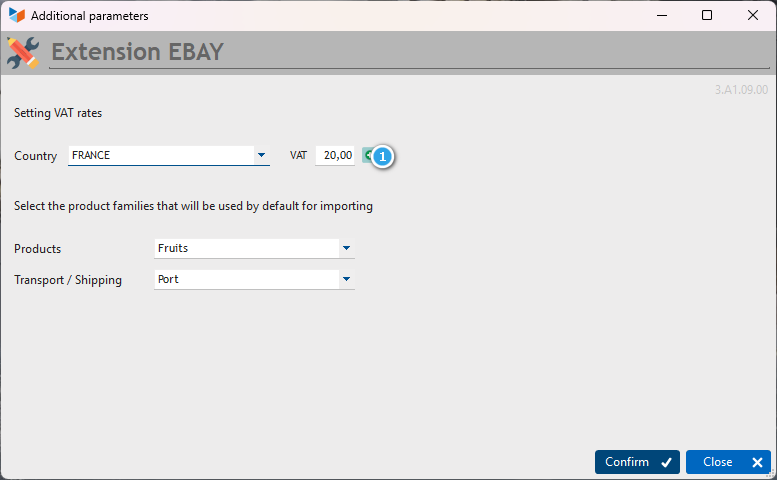
This screen allows you to select the default product families for the import. The first is used for products and the second for any transport and delivery charges.
You can also adjust the various VAT rates according to your business and location. The 1 button allows you to save any changes.
Usage
Access: Business → Import eBay

The 1 button allows you to select the file to be processed, whilst the 2 drop-down menu allows you to specify the separator used in the file to be processed.
The Import button triggers the processing.
 If a town is not found in the postcode file, it is automatically added to it. Please remember to check that the information is correct before importing the data.
 If the products in the file support stock management, stock movements are automatically created. Any stock alerts will be displayed in the Stock Alerts tab.
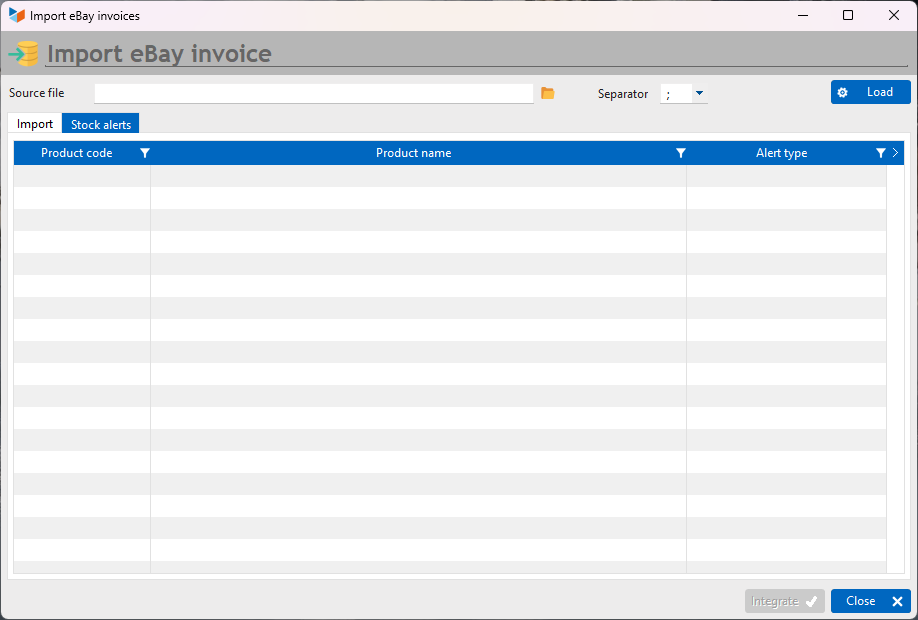
Some alphabets may not be recognised by the extension. The relevant row will then be displayed in red and the relevant columns will show “Unrecognised characters”. You can edit these elements directly in the table before importing the data.
Input file format
The input file must be a CSV (or text) file with a delimiter (TAB, comma, semicolon or any other character). This is an export file generated from eBay.
Some columns in the file will not be used during processing.
  1            2                  4               6             7                     8                   9
SALE NUMBER | ORDER NUMBER | BUYER’S NAME | BUYER’S MESSAGE | BUYER’S ADDRESS 1 | BUYER’S ADDRESS 2 | BUYER’S TOWN |
 10                         11                    12            15                 16                   17
BUYER’S REGION/STATE | BUYER’S POSTCODE | BUYER’S COUNTRY | RECIPIENT’S NAME | RECIPIENT’S TEL | RECIPIENT’S ADDRESS 1 |
 18                        19                      20                    21                22                24
RECIPIENT’S ADDRESS 2 | DELIVERY TOWN | DELIVERY REGION/STATE | DELIVERY POST CODE | DELIVERY COUNTRY | ITEM DESCRIPTION |
   25          27           28                   29                   40         50           53            54
DESCRIPTION | QUANTITY | SELLING PRICE | DELIVERY/SHIPPING COST | eBay Tax | TOTAL PRICE | SALE DATE | PAYMENT DATE |
   63
DELIVERY SERVICE
In the case of an eBay order containing several items, the first line contains the general order details:
- Buyer and delivery details
- The total quantity of items
- The total sale amount (in the ‘Sale price’ column)
- The total amount, dates and delivery service
This line is followed by several product lines. These contain only product details (quantity, sale price, product title and description) and the sale and order numbers (which are identical to those on the first line).
Versions
| Version | Date | Comments |
|---|---|---|
| 3.A1.09.00 | 12/08/26 | Adaptation for Gestan A1.09.01 |
| 3.A1.08.02 | 14/03/25 | Migration to A1 format |
| 3.15.46.02 | 14/03/25 | First beta version |
| 3.15.46.01 | 12/03/25 | First alpha version |
ℹ️ Other ‘Extensions’ articles
CAISSETACT Touchscreen till (configuration)
CERFA : Generating CERFAs
COMMISSIONSCO: Sales commissions
CYBERBANQUE: Integration of banking files
DRM: Monthly Summary Declaration
EBAY: eBay Interface
ETIQUEXPED: Shipping labels
INTEROR: repair orders (RO)
OBJVENTE: Sales targets
PREPBON: Picking slips
PRESTIMPORT: Prestashop Interface
RELAUTO: Automatic mass invoice reminders
SAVTICKET: After-sales service tickets
SCAN: Scanning a barcode
SUIVCOM: Order Tracking