Consumption: Chrono
 A1 proofreading not yet effective for this page. In the meantime, you can ask any questions on the forum.
Chrono is an application for timing the consumption of hourly resources. It is thus possible to precisely measure work times (called “consumption” under Gestan), the most frequent use being the invoicing of tasks invoiced under time management.
Usage
Access: Projects → Chrono
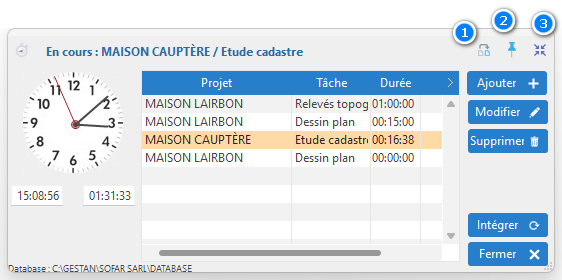
Chrono can be launched internally, or independently of GESTAN.
The Add button allows you to select a project/task. Double clicking on the line triggers time measurement for the selected project/task (and the line turns orange).
The Modify button allows you to modify the measured duration, or to add a more precise description for the current work.
The Integrate button opens a window which allows you to add the measured values to the time consumed file.
The 1 button is used to add projects/tasks from the previous day. No need to re-enter them!
The 2 pin is used to constantly display Chrono on the screen. Otherwise, it is minimized in the Windows bar, which the 3 button allows you to do immediately.
 Other articles “Projects, tasks, work times”