Manufacturing lot numbers
 A1 proofreading not yet effective for this page. In the meantime, you can ask any questions on the forum.
Gestan allows you to manage the manufacturing batch numbers or serial numbers of your products.
For each product concerned, it is possible to record the characteristics of the manufacturing batches, possibly with tracking of the numbers. The batch or serial number may be recorded on any invoice or BL.
The management of serial numbers requires the attention of the operator: in fact, if the program will check that the serial number is within the ranges defined for the lot, it will not check if this or that n ° serial has already been used on an invoice or a BL.
List of manufacturing batches
//Prerequisites: ** Check the box **Manage manufacturing batches in the general settings, and optionally the box No. series on stock movements. Then check the box Management of batch numbers or Management of serial numbers for each product sheet concerned. //
//**Access: ** Products → Manufacturing batches //
The screen presents the list of batches recorded for each product.

The Show button opens the screen which presents all the invoices or all the BLs in which the selected lot number appears.
Manufacturing batch sheet
It allows you to record a batch number for each manufacturing batch, as well as additional information concerning the batch.
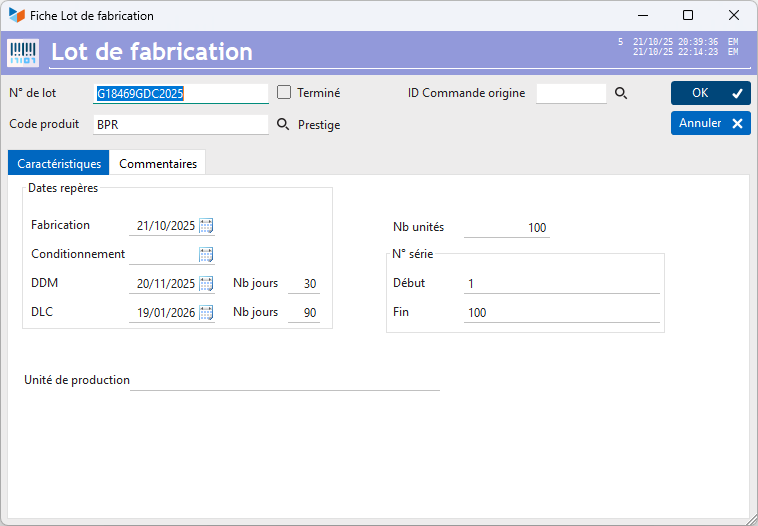
There are two types of expiry dates: a minimum durability date (DDM or best before ) for products that can be kept longer and a use-by date (**DLC ** or consume until ) for products that are quickly perishable.
The DDM on a food product does not have the same imperative nature as the use-by date. The shelf life is the date after which the consumption or use of a product becomes potentially dangerous for health. It is indicated on perishable and packaged food products: already cut meats, cold meats, refrigerated ready meals, yogurts, etc.
It is possible to note the original order ID, if the batch was manufactured for a particular order.
NB units is the number of units produced for the batch.
You can indicate a start and end Serial number for the batch, if you also manage a serial number on the products in your batch.
Entering an invoice or a BL
When entering, for an invoice or a BL, a product concerned by the management of batch numbers or serial numbers, an intermediate screen will allow you to select a batch, or to specify a serial number.

When entry number management is activated for a product, the product quantity can only be 1, which corresponds to the serial number. If you have several identical products with entry number management, enter one line per product.
Note that the entry number must be within the limits of the lot, if applicable.
On the invoice or the BL, the batch number will be indicated, as well as the expiry date if it has been provided.

Access to the list
From the context menu of the list of part items (invoice or BL), the Manufacturing batches and serial number menu allows you to display all the products under management of manufacturing batch number or serial number. standard and possibly make the necessary corrections.

The 1 magnifying glass will allow you to select this or that batch for each product in the part, or to enter the corresponding serial number directly into the table.
Appearance of the documents produced
The batch number or serial number will be printed on each line.

 Other “Products” articles