Absences
 A1 proofreading not yet effective for this page. In the meantime, you can ask any questions on the forum.
Gestan allows you to manage user absence dates, for any reason:
- leave, naturally,
- but also illness, training, maternity, etc.
List of absences (user view)
Access: Company→ Absences

The screen presents the list of absences for the connected user, by vintage. It is possible to display them from January to December, or from June to May, in France holidays are counted over this period.
List of absences (HR view)
Access: Human resources→ List of absences

This is the same view as for the user, but the 1 combo allows you to select the user whose absences you want to display. The 2 combo allows you to select the reason for absence.
The Validate button allows the HR manager to validate the absence. This is particularly useful for annual leave for employees whose leave dates must be validated by management.

The context menu allows this screen to display only the absences to be validated.
Absence form
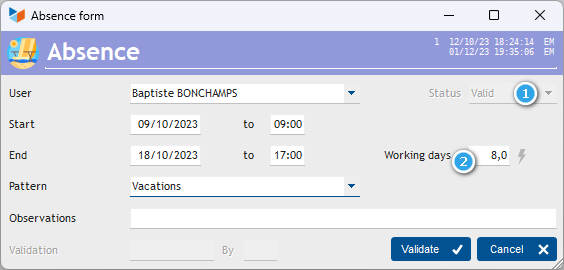
If the Validated 1 box is checked, the absence can no longer be modified (unless de-validated by a user with work time administration privileges).
The program automatically calculates the number of working days 2 corresponding to the period of absence, taking into account weekend days, and days holidays. It is entirely possible to count a number of days different from the number of days calculated. In this case, this area is marked with a special color.
Absences are displayed in the list of work times screen.
Finally, the CNS1 report (CRA, Activity Report), will take into account the days of absence separately from the days worked.
Absence schedule
Access: Company→ Absence planning

The 1 combo allows users to be selected according to their status (internal/external). If services have been declared, the 2 combo allows you to select the users of the service concerned.
On the absence schedule, with the mouse, you can draw a period of absence, or by right clicking on the schedule > Open list, this opens the absence record.
Note:
 Working days: these are all days of the week except the weekly rest day (Sunday), and public holidays; Saturday is not usually counted as a day of rest. It is therefore a working day. Thus, in a typical week (without public holidays), there are 6 working days.
Working days: these are the days during which your company is open, these are the days actually worked in the company. Thus, when the company is open from Monday to Friday or Tuesday to Saturday, there are 5 working days in the week, i.e. 5 working days.
**How is the number of days calculated ** We start by calculating the duration separating the start of the period from the end. For example, there are 2 hours between 06/26 2:00 p.m. and 06/26 4:00 p.m. Then we divide this duration by the conventional duration of the day, defined in the general parameterization.
 Other Users articles