Rentals / Loans (single lines)
 A1 proofreading not yet effective for this page. In the meantime, you can ask any questions on the forum.
With Gestan you can register and invoice any equipment rental, whether bicycles, musical instruments, hotel rooms, boat or caravan pitches, etc.
Gestan is suitable for:
- single-line rentals: for example, you rent pianos, generally only one piano per rental
- multiline rentals: for example, you rent sound equipment, always several pieces of equipment per rental.
List of rentals
Prerequisites: in the general configuration, machine tab, declare machines-location.
Access: Activities → Rentals
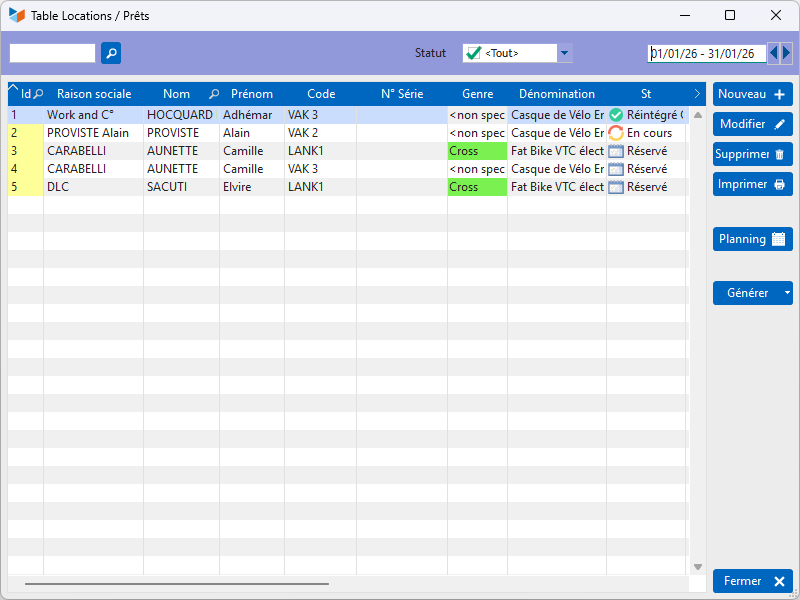
It presents the list of rentals for the selected period.
The Type column displays the type of equipment (and not the type of rental).
The Gen Fact button allows you to generate the invoice automatically for the selected rental. The method of calculating invoiced durations is detailed here.
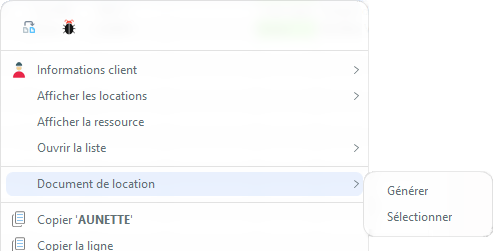
The contextual menu of the table allows you to position an Anomaly on any location.
It also allows you to edit a Rental Document (typically, a rental contract, but it can also be a user manual, connection codes, etc.).
The rental sheet
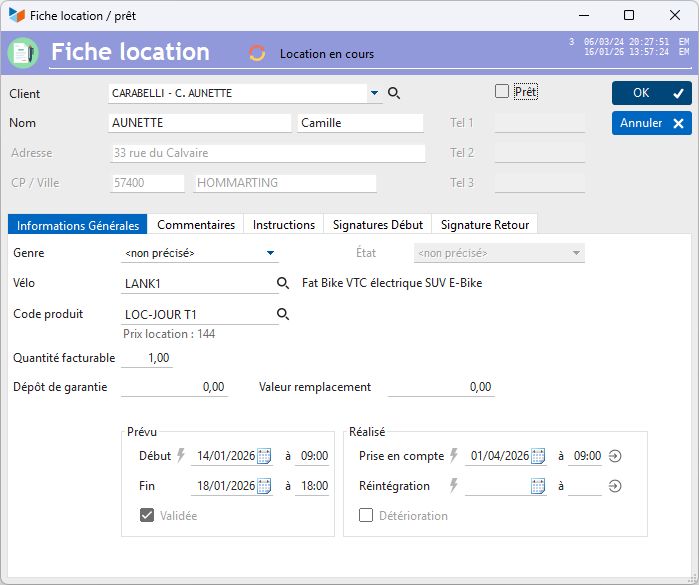
The Client combo displays all contacts who have had a rental in the last 365 days, and allows you to quickly create a client.
The Loan checkbox indicates that this is a loan, not a rental.
You can indicate a security deposit, if applicable.
Then select the equipment being rented.
If you indicate a product code, Gestan will be able to automatically generate the corresponding invoice, depending on the price of the product, its sales unit if it is hour, day, half-day, or same day/man (See calculation details). The price that will be taken into account will be that indicated on the machine rental sheet (here, the VEL2 bike sheet), regardless of the product code.
Indicate a scheduled rental start and end date (+ one time if you manage rental hours, based on the general settings) in the Scheduled fields. If dates overlap, the software will indicate this to you before validating the form.
You can use the Validated box to indicate that you have validated the reservation.
In the Completed areas, you can indicate the actual rental start and end dates (with possible times).
The Deterioration box is intended to note the fact that a machine has been returned to you damaged.
 Other “Machines” articles