Quote
 A1 proofreading not yet effective for this page. In the meantime, you can ask any questions on the forum.
Quotes are the documents by which your company undertakes to carry out, for a client, a defined job for an agreed price.
In France, quotes have contractual value. If you issue a quote to a client, and you do not perform the agreed service at the agreed price, your client may take action against you.
List of quotes
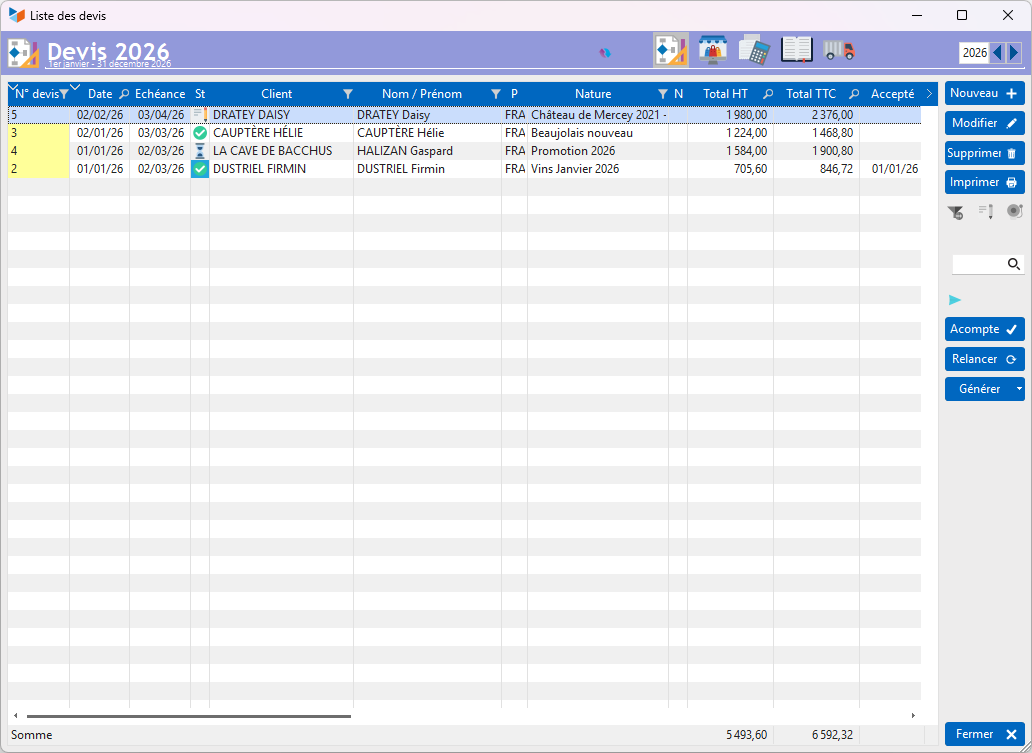
The screen displays all quotes issued during the selected financial year.
The Deposit button, activated for any quote not used to generate an invoice, allows you to record the payment of a deposit on the quote. When the quote is transformed into an invoice, it will be taken into account and automatically linked to the newly created invoice.
The Relaunch button displays the quote reminder screen.
The Generate button allows you to trigger (according to the general parameterization) the generation program from the quote:
- an order, an invoice, a complete or partial BL,
- a price request, a supplier order,
- a project
- or an intervention.
(It is possible to create quotes from orders and invoices, or from price requests and supplier orders.)
Modification of a quote
Modification of a quote is authorized as long as the quote is not sent to the customer: if the “Sent” box is checked, or the agreement date is entered, the quote can no longer be modified. Only users with administrator privileges will be able to make it editable again, by deleting the agreement date and unchecking the “Transmitted” box.
Deleting a quote
The deletion of a quote is authorized for all users (as opposed to the deletion of invoices and credit notes, reserved for Gestan administrators with document administration privileges). The deleted quote number will not be reused (see page numbering).
The context menu of the quote list contains the items common to all the parts.
It also includes a Print consideration option, intended to print the consideration sheet if the quote is linked to equipment (machine).
Generation of an intervention
The Generate button allows you to generate an intervention from a quote.
The quote lines will be reported in the intervention as ingredients. If these lines contain a date and possibly a time (in DD/MM/YYYY HH:MM format), they will feed the ingredient's date terminals (start dates/time and end date/time).
Generation of a project
The Generate button allows you to generate an intervention from a quote.
For example, a Homework quote includes the following lines:
| MO finishing | PROD3 | Coat wall | 4 hours |
| MO painting | PROD1 | Bathroom painting | 1 Day/Man |
| MO finishing | PROD2 | Finishes | 4 hours |
| Painting | PROD3 | White paint | 1 jar |
The project generated from the quote will be called “Homework”, assigned to the quote contact, with 3 possible options:
- a single MO task: the project will include a single task, “Labor”, calculated on the basis of all products considered as Labor via the family to which they are linked. In this case, the task will last 2 man/days.
- one task per family: a finishing MO task of 1 day/man and a painting MO task of 1 day/man will be created.
- one task per product: a task is created for each product. Here, three tasks will be created, a “Coating wall” task of 0.5 man-days, a “Bathroom painting” task of 1 man-day, and a “Finishing” task of 0.5 man-days.
Quote sheet
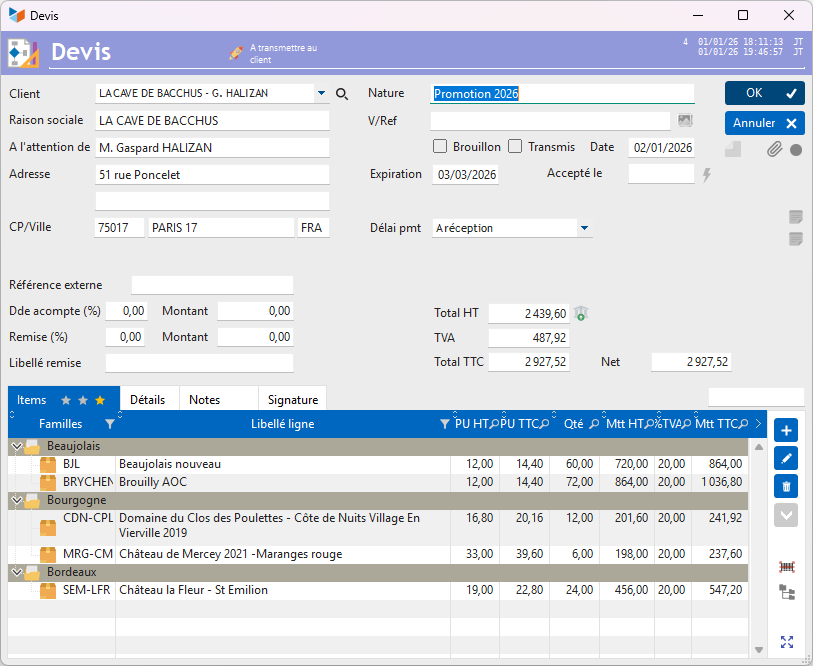
The screen contains the following data:
- the customer you are dealing with.
- the nature of the quote. This is the general nature of the operation for which you are estimating, for example “installation of a French window”, or “software creation”
- the Draft box indicates that the quote is being drafted, or transmitted to the customer.
- the case Transmitted indicates that the quote was sent to the customer by mail, email, or any other means. If this box is checked, the quote can no longer be modified, unless there are sufficient privileges.
- The quote due date. It is calculated with the default validity period indicated in the application settings screen.
The “Notes” tab allows you to add a note to the quote (such as “Our advice: replace your obsolete machine” on an IT intervention quote)
It is possible to print a wording at the bottom of the quote common to all quotes (for example “Member of an approved management center”). This label is set via the application settings screen.
When entering an invoice line, the VAT rate is entered with the VAT rate entered on the product sheet, unless the customer sheet indicates a VAT rate to be applied for the customer. If no data is found, it will be populated with the VAT rate defined by default in the accounting settings.
Optional products
The context menu of the items table of the quote sheet allows you to declare certain quote lines as optional. This menu adds a specific string in the quote lines:
- \OPTION\ for the options whose prices we want to display on the quote
- \+OPTION\ for an option for which we do not want to display the price
The total amount of the quote will not include the amount of options. Options will be printed separately.
When transforming the quote into an invoice, a pop-up will ask whether the options should be taken into account. If only some need to be taken into account, answer yes: it will be easier to delete the options not included in the invoice than to re-create them identically. The quote option lines will be indicated by (O) in the invoice, a mention that you can delete if necessary
Generate recurring invoices from a quote
Via planned actions, it is possible to automatically generate invoices with regular deadlines from a quote, for example if you invoice annual, monthly, bi-weekly subscriptions, etc.
 Other Customer Billing articles
Billing: common elements