Billing schedule
 A1 proofreading not yet effective for this page. In the meantime, you can ask any questions on the forum.
For quotes, orders, and customer invoices, it is possible to record an invoicing schedule, i.e. to divide the total amount of the item into partial amounts, to be paid on a scheduled date.
A dedicated screen allows you to follow the payments of invoices under a schedule.
Using the screen
When you indicate, for an invoice, a payment deadline of type “Split”, Gestan offers you to immediately create an invoicing schedule for the current invoice (invoice sheet screen ).

If you answer yes, the schedule generation screen is displayed.
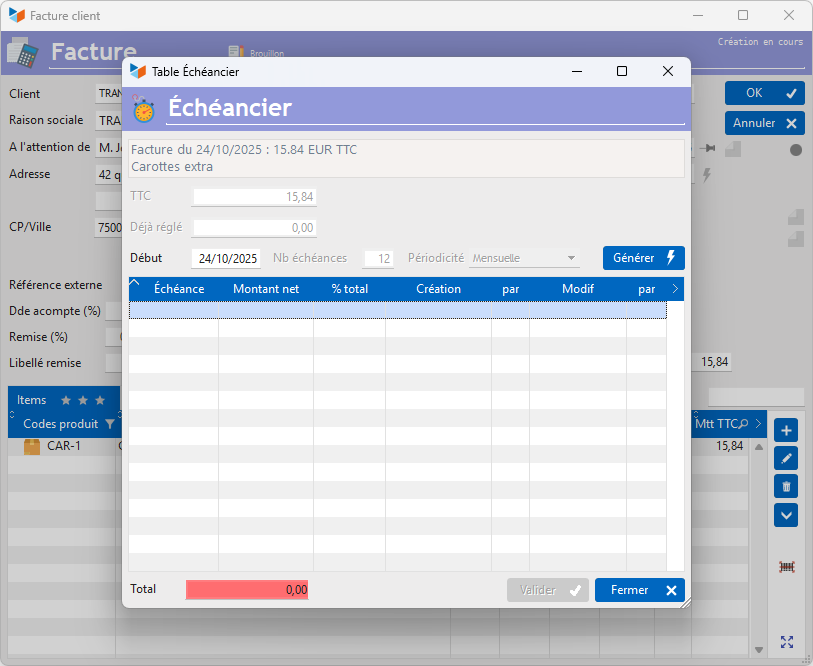
On this screen, the number of due dates and the periodicity can be modified, unless you have specified these parameters at the payment deadline level. The Start date is by default that of the invoice, it is always modifiable.
The Generate button allows you to automatically generate deadlines.
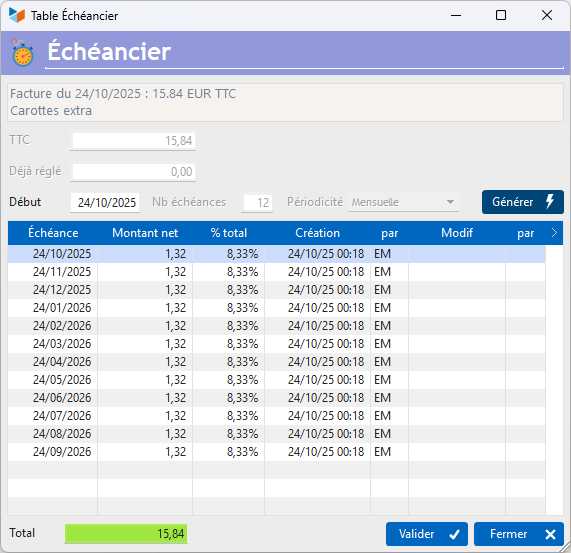
You can modify dates and amounts as you wish, add and remove deadlines. The only imperative is that the total of the due dates equals the amount of the invoice.
You can modify the schedule by clicking on the timer which designates a due invoice, in the list of invoices.

On invoices to which due dates are attached, this information can be printed at the bottom of the page, as below:

 To trigger the printing of the schedule on the invoice, this is configured in the general configuration of Gestan, "Options by types" tab.
Depending on the setting options, the complete schedule can be printed, above the notification of the due date to be paid.
 Other Customer Billing articles
Billing: common elements